
Welcome To Macdonald's UK , The Realm Of Delicious Food

From 17th March 2026, MyMcDonald’s Rewards is getting an update — including fresh new rewards and some changes to how many points are needed to redeem.
How many McDonald’s rewards points can I use?
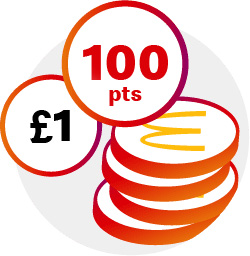
Level 1. After you save 2000 points, you can exchange them for:
- Regular Soft Drink
- Regular Tea
- Expresso
- Americano McCafé
- Mini McFlurry
- Hash Brown
- Small Fries
- Side Salad
Level 2. As soon as your account reaches 3500 points, you are able to redeem:
- Sausage Sandwich
- Regular Latte
- Cappuccino
- Mixology
- Flat White McCafe
- Cheeseburger
- Medium Fries
- Mayo Chicken
- Cheesy Bacon Flatbread
- Apple Pie
- Regular McFlurry
- 4 Chicken McNuggets
Level 3. If you’ve already gained 5000 points, you can save up for:
- Large Fries
- Cheese Side
- Caramel Frappe
- Brownie
- 6 Chicken McNuggets
- Double Cheeseburger
- Sausage & Egg McMuffin
- McChicken Sandwich
- Filet-O-Fish
- Mozzarella Dippers
- Chicken Salad
- Medium Milkshake
Level 4. If you’ve already gained 6500 points, you can save up for:
- 3 Chicken Selects
- McCrispy
- Big Mac
- Double Sausage
- Egg McMuffin
- 9 Chicken McNuggets
- McPlant
- Double Filet-O-Fish
How to get McDonald’s rewards?
There are several ways to earn MyMcDonald’s Rewards points:
- Download the McDonald’s app, create an account, and join MyMcDonald’s Rewards.
- Earn 1 point for every penny you spend on eligible menu items at participating McDonald’s restaurants.
- Collect points when ordering through the McDonald’s app, at a kiosk, in the drive-thru, at the front counter, or through McDelivery in the app.
- If you order at a kiosk, drive-thru, or front counter, show your one-time code from the McDonald’s app before completing your purchase to receive points.
- Check the Rewards & Offers section in the app regularly for bonus point promotions and special deals that can help you earn points faster.
- The more you spend, the more points you collect, allowing you to unlock free food, drinks, and other rewards.
Important update about points expiration:
- From 30 December 2025, MyMcDonald’s Rewards points will expire 6 full calendar months after they are earned instead of the previous 12 months.
- This change applies to both existing and future points.
- Any points earned before 30 June 2025 will automatically expire on 1 January 2026 unless you redeem them before that date.
How to use McDonald’s rewards?
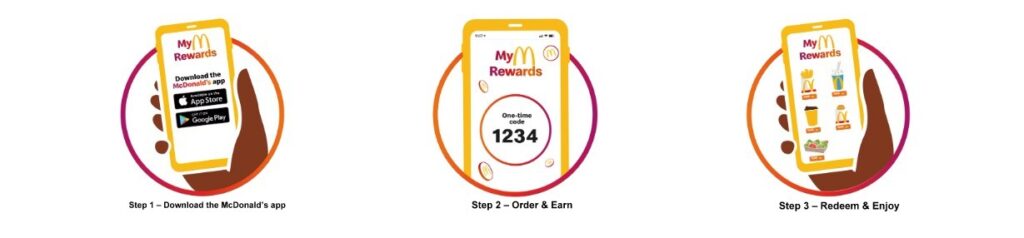
How Do I Redeem Points for Rewards?
If you have enough points for a reward, the reward will be unlocked in the Rewards Menu. You can redeem your reward at a participating restaurant at the Kiosk, Drive-thru, Front-Counter, McDelivery via the McDonald’s app or orders made on your McDonald’s app.
How can I earn points and redeem rewards at the Kiosk?
Earning and redeeming rewards with MyMcDonald’s Rewards is simple. To collect points, open the McDonald’s app and go to the Code section. When placing an order at a participating restaurant, enter or scan your one-time code at the kiosk, drive-thru, or front counter before completing your purchase. Your points will then be added to your account automatically.
When you’re ready to use your points, log in to a participating restaurant’s digital kiosk using the McDonald’s app and choose a reward from the Rewards Menu before placing your order. You can also select a reward directly in the McDonald’s app, tap Add to your code, and then use that code when ordering to redeem your reward.
How can I earn points and redeem rewards at the Drive-thru?
Please ensure you are safely parked with your engine switched off before opening and using the McDonald’s app.
Earning points and redeeming rewards with MyMcDonald’s Rewards is easy. To earn points, simply go to the ‘Code’ section on the bottom right of your McDonald’s app and tell our crew member your one-time code during your order at the Drive-thru at a participating restaurant.
If you would like to redeem a reward, select your reward from the Rewards Menu in the McDonald’s app and choose ‘Add to your code’ and tell our crew member your one-time code during your order at the Drive-thru at a participating restaurant.
How can I earn points and redeem rewards at the Front-Counter?
Earning points and redeeming rewards with MyMcDonald’s Rewards is easy. Simply go to the ‘Code’ section on the bottom right of your McDonald’s app and tell our crew member this one-time code during your order at a participating restaurant, to earn points.
If you would like to redeem a reward, select your reward from the Rewards Menu in the McDonald’s app, choose ‘Add to your code’ and tell our crew member this one-time code before completing your order at a participating restaurant.
How can I earn points and redeem rewards when I order on the McDonald’s app?
You are automatically earning points when you place an order at a participating restaurant, using your McDonald’s app. Although points cannot be earned on any spend on bag tax, fees incurred on delivery (such as service, small order and delivery fees), tips for delivery drivers or riders, charitable donations, loading money on a gift card and purchase of gift certificates and gift vouchers.
If you would like to redeem a reward, head to the Rewards and Offers section of the McDonald’s app. Then simply select your reward from the Rewards Menu and press ‘Add to mobile order’ (for pickup orders) or ‘Add to McDelivery order’ (for delivery orders using our app) before placing your order at a participating restaurant.
Can I Redeem a Reward and Earn Points in the Same Order?
Yes! You will still earn 1 point for every penny you spend on menu items even if you’re redeeming a reward in the same transaction. If you’re ordering via Kiosk, Front Counter or Drive-thru at a participating restaurant, you need to let us know your 4-digit code, which can be found in the ‘Code’ section of the McDonald’s app!
Is there a limit on how many points I can earn?
At any one time your MyMcDonald’s Rewards points balance must not exceed 100,000 points.
MyMcDonald’s Rewards points can only be collected on the first 10 transactions you make each day, up to 40 transactions per week. If you make more than 10 transactions in a day or more than 40 transactions in a week, MyMcDonald’s Rewards points will not be collected on those transactions.
What If I Forgot to Provide My Code?
Unfortunately, you need to use your code when ordering via Drive-thru, Kiosk or Front Counter at a participating restaurant. But don’t worry, you can earn on your next order with us when using your Rewards account at a participating restaurant.
I Just Made a Purchase and My Points Aren’t There—Can You Help?
If your MyMcDonald’s Rewards points haven’t appeared in your account, first make sure you used your one-time code from the McDonald’s app when placing your order at the Drive-thru, Kiosk, or Front Counter. Unfortunately, if the code wasn’t used during the purchase, points cannot be added to your account later.
In most cases, points are added to your account right away. However, in some situations, it may take up to 48 hours for them to show up. Before reporting missing points, wait at least 48 hours after your purchase.
If your points still haven’t appeared after 48 hours, you can contact McDonald’s through the app by following these steps:
- Open the McDonald’s app and tap More.
- Select Customer Service.
- Open the Virtual Assistant located in the bottom-right corner.
- Choose MyMcDonald’s Rewards.
- Provide details about your order, including
- Your order number
- The total order value
- Any information that may help explain why points are missing
Keep in mind that missing points claims must be reported within 30 days of your purchase, as McDonald’s may not be able to investigate requests submitted after that period.
What parts of my order can I earn points on?
You can earn points on your spend on food & drink items ordered at participating restaurants using the McDonald’s app provided that you identify your MyMcDonald’s Rewards account before you complete your purchase. You currently can’t earn points on bag tax, fees incurred on delivery (such as service, small order and delivery fees), tips for delivery drivers or riders, charitable donations, loading money on a gift card, purchase of gift certificates and gift vouchers or orders made via third party delivery services (such as Just Eat, Uber Eats).
Can I earn points on McDelivery?
Yes, you can earn points on McDelivery but only if you order via the McDonald’s app from a participating restaurant. Please note that fees apply to delivery orders.
Unfortunately, you can’t earn points when ordering from third party delivery services.
How can I verify my MyMcDonald’s Rewards points balance?
You can check your points balance on the top right of the Rewards & Offers section in your McDonald’s app.
What is a Bonus campaign?
From time to time, McDonald’s will, at its own discretion, offer Bonus campaigns where you can earn extra points on specific items or orders at participating restaurants.
Can the Rewards Menu change?
Yes, it can change. Keep a look out on the rewards page of your McDonald’s app.
Do points expire?
Everything good has to come to an end. Each point is valid from the date on which it is earned for 6 full calendar months + the first day of the following month. For example, if you earn points on 4th January 2026, you can redeem those points until 23:59 on 1st August 2026. You can check your points balance and corresponding expiry dates in the ‘View History’ tab in the Rewards & Offers section of the app.
How do I donate the value of my points to charity?
First, go to the ‘Rewards & Offers’ section on the McDonald’s app and choose from the Rewards Menu which one of our charity partners you’d like to donate your points value to – the equivalent value of points for donation purposes is £2 for 2000 points, £3.50 for 3500 points, £5 for 5000 points and £6.50 for 6500 points!
We may change or add partner charities from time to time. Our current charity partners are Ronald McDonald House Charities (UK), FareShare and BBC Children in Need.
Next tap ‘Add to bag’. Then just follow the normal checkout process to finalise the donation. Gift aid can’t be claimed on donations of points value.